
Job Offer Email Template
$2.99
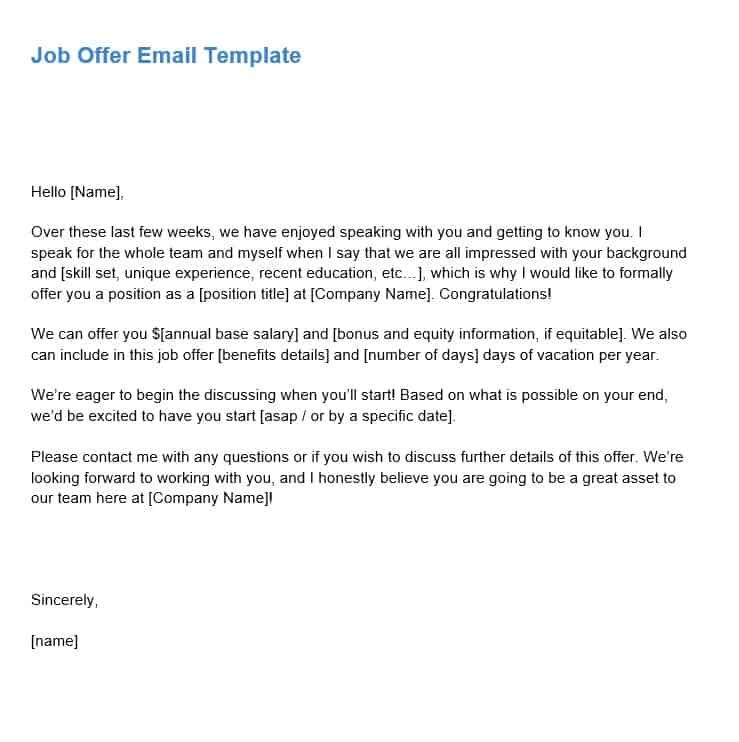
Use this email template to present a formal job offer to a new employee.
Templates are starting points. Adapt them to your contract and to the laws and safety rules where you work. They are not legal advice.
Product FAQ
You will receive your documents and files immediately after you complete the checkout process. You will receive a link on the checkout page as well as via email.
As long as the document remains on Essential Construction you will be able to download it once purchased.
Yes, in most cases (with the exception of stock photography and ebooks) the files you will receive are editable.
We accept debit, all credit cards (Visa, Amex Mastercard etc) as well as payments via Apple Pay, Google Pay and Paypal.
Our return policy varies based on the product, for more information you can find our detailed return policy here.
Our documents are for use on your projects. You may not resell these documents on other marketplaces.
Full Description
This job offer email template helps you make a clear, professional offer to a new hire, whether you are bringing on a site supervisor, an estimator or an apprentice. It sets out the key terms in one message so the candidate knows exactly what you are offering and what happens next.
What is a job offer email?
A job offer email is a written message from an employer to a successful candidate that formally offers them a position. It confirms the job title, pay and compensation, start date, time off and the main requirements of the role, and asks the candidate to accept by a set date. Many employers send it after a verbal offer, and follow it with a formal offer letter or employment agreement for signature.
When to use it
- Confirming a verbal offer to a field or office hire in writing
- Making an offer quickly when good candidates have other options
- Hiring seasonal crew, apprentices or project-based staff
- Recording the agreed salary, start date and vacation terms before onboarding
- Keeping offer wording consistent across hiring managers
What’s included
The template is an editable Word document (.docx) with email wording you can adapt. It includes:
- Salary and compensation details
- Vacation details
- Start date
- Role requirements
How to fill it out
- Write a clear subject line, such as “Job offer: Site Supervisor at [Company]”.
- Open by congratulating the candidate and naming the position.
- Enter the salary or hourly rate, pay frequency and any other compensation you agreed.
- Add the vacation details and the proposed start date.
- Summarize the role requirements, such as reporting line, work location, hours and any certifications or tickets needed.
- State any conditions, such as references or a drug and alcohol test, if your company requires them.
- Explain how to accept and give a response deadline, then add your name and contact details.
- Check every figure against the approved offer before you send it.
Tips
- Call the candidate first, then send the email the same day so the written terms match what you said.
- Keep the tone warm but precise. Avoid promises you have not approved, such as future raises.
- Use the same figures in the email and in any formal offer letter or contract.
- Have someone in HR or management check the wording if you hire in more than one region.
Related templates and guides
- New Employee Welcome Letter
- Employee Handbook Template
- Safety Orientation (Employees)
- Employee Promotion Letter
- Human Resources templates
Frequently asked questions
What does a job offer email look like?
A good job offer email has a clear subject line, a short congratulations, the job title, pay, start date, time off and main role requirements, any conditions of the offer, and simple instructions for accepting with a deadline. It ends with the sender’s name and contact details. It is usually one screen long.
What should I write when sending an offer letter by email?
Keep the email short. Congratulate the candidate, say the formal offer letter is attached, highlight the key terms such as position, pay and start date, explain how to sign and return it, and give a deadline. Invite them to call you with any questions before they accept.
Is a job offer email the same as an offer letter?
Not always. A job offer email can be the offer itself or a cover note for a formal offer letter or employment agreement. Many employers use the email to make or confirm the offer quickly, then ask the candidate to sign a formal document. Requirements vary by location, so check local employment rules.
How long should a candidate have to accept a job offer?
There is no fixed rule. Many employers allow a few business days to a week, which gives the candidate time to review the terms without stalling your hiring. State the deadline in the email so expectations are clear on both sides.
What subject line should a job offer email use?
Use a clear, specific subject line that includes the words job offer, the position and your company name, for example “Job offer: Project Coordinator at ABC Construction”. This helps the candidate find the message and stops it being missed among other emails.









Reviews
There are no reviews yet