

Construction Project Contact List
- Identify key contacts for companies
- Record important contact information
- Save time by keeping information centralized
Templates are starting points. Adapt them to your contract and to the laws and safety rules where you work. They are not legal advice.
Product FAQ
You will receive your documents and files immediately after you complete the checkout process. You will receive a link on the checkout page as well as via email.
As long as the document remains on Essential Construction you will be able to download it once purchased.
Yes, in most cases (with the exception of stock photography and ebooks) the files you will receive are editable.
We accept debit, all credit cards (Visa, Amex Mastercard etc) as well as payments via Apple Pay, Google Pay and Paypal.
Our return policy varies based on the product, for more information you can find our detailed return policy here.
Our documents are for use on your projects. You may not resell these documents on other marketplaces.
Full Description
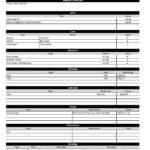
This project contact list template keeps the key people on your construction project in one place, with their company, phone number, address and email. Set it up at the start of the job and update it as people join or leave, so anyone on the team can quickly find who is responsible for what.
What is a project contact list?
A project contact list is a document that records the key individuals and companies involved in a construction project and how to reach them. It usually covers the owner, consultants, contractor staff, subcontractors, suppliers and authorities. Because large projects involve hundreds of people, a central list saves time and avoids mistakes when sending information, chasing approvals or responding to issues on site. It is typically prepared at project start and updated throughout the project lifecycle.
When to use it
- At project startup, when the team is first assembled
- When subcontractors and suppliers are awarded and need to be added
- When distributing RFIs, submittals, meeting minutes and transmittals
- When new site staff or consultants join and need to know who is who
- When personnel change, so old contact details are not used by mistake
What’s included
The download is an Excel spreadsheet (.xlsx), so it works with most modern spreadsheet software, including Excel, Google Sheets and Numbers. It is set up to:
- Identify the key contacts for each company
- Record company name, phone number, address and email
- Keep all contact information centralized in one file
How to fill it out
- Enter the project name and number at the top of the sheet.
- Group contacts by role, such as owner, design team, contractor, subcontractors, suppliers and authorities.
- For each person, enter their company, name and role or trade on the project.
- Add phone numbers, email and the company’s address.
- Note who the main contact is for each company and any after-hours or emergency contacts.
- Date the list, save it where the team can access it, and update it whenever someone changes.
Tips
- Assign one person to own the list. Shared lists without an owner go out of date fast.
- Add the role or trade for each person, not just their name.
- Re-issue the list after major award stages so everyone has the latest version.
- Share only what people need and keep personal details within the project team.
Related templates and guides
- Project Directory Template
- Emergency Contact Numbers Form – keep emergency numbers posted on site.
- Project Meeting Minutes Template
- Browse all administration templates
- Seven Steps to Construction Startup
Frequently asked questions
What should a construction project contact list include?
At a minimum, include each person’s name, company, role on the project, phone number, email and company address. Many teams also add the trade or scope, a main contact flag for each company, and after-hours or emergency numbers for key people.
Who maintains the project contact list?
Usually the general contractor’s project coordinator, project engineer or project manager keeps the list. They update it when new subcontractors are awarded or staff change, and re-issue it to the team so everyone works from the same version.
What is the difference between a project contact list and a project directory?
The terms are often used interchangeably. A contact list is usually a simple table of names and contact details, while a project directory may add more context, such as company roles, scopes of work and organization structure. Either way, the goal is a single source of contacts.
Can I use this contact list in Google Sheets?
Yes. The template is an Excel file, so you can open it in Excel, upload it to Google Sheets or open it in Numbers. Sharing it online makes it easier to keep one current version for the whole team.




Alisia Richardson –
I really needed this document so we can keep up with who we are using and connecting with during the project.