
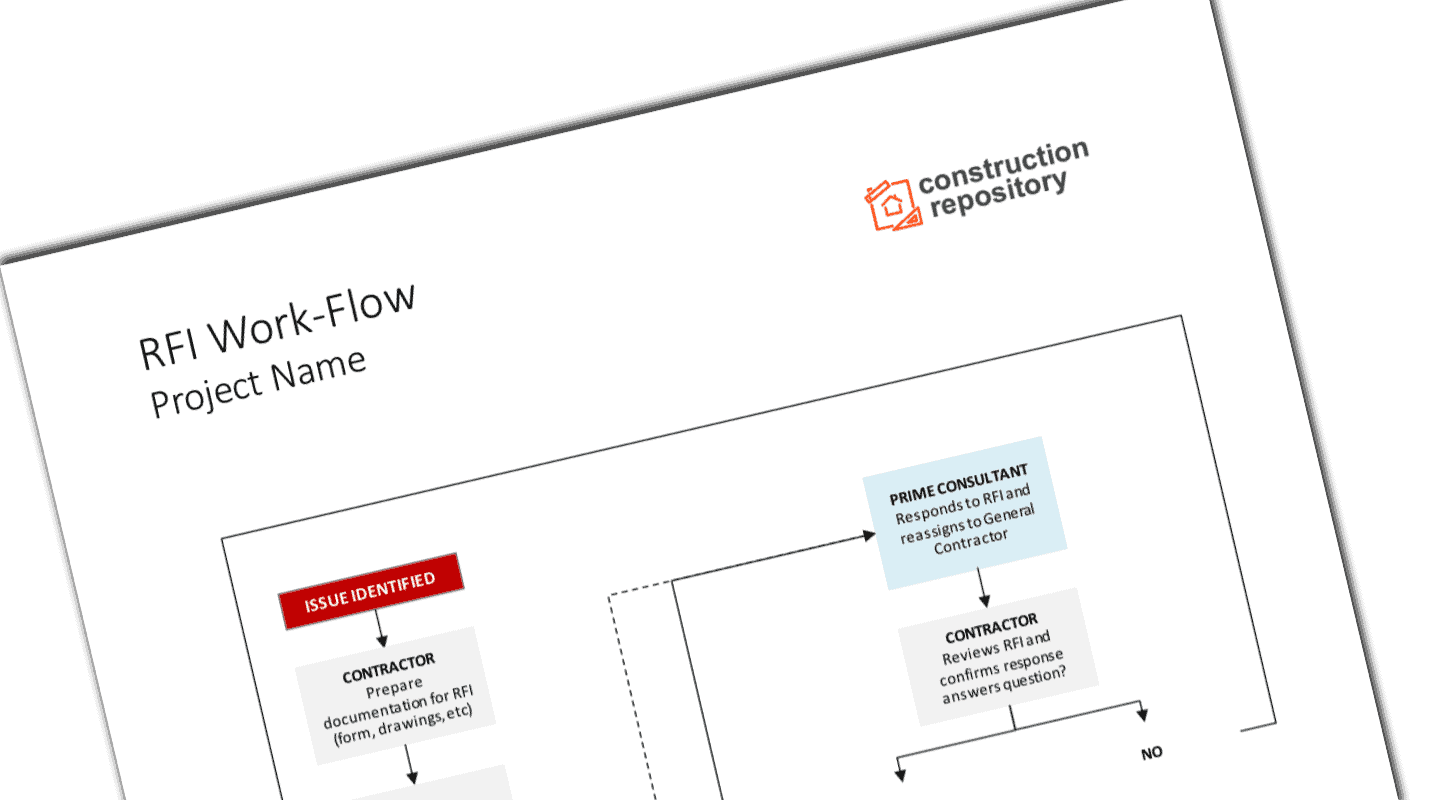
Construction RFI Workflow Template
$4.99
- Understand the workflow of RFIs
- Communicate consistently amongst the project team
- Develop a partnership with consultants
Templates are starting points. Adapt them to your contract and to the laws and safety rules where you work. They are not legal advice.
Product FAQ
You will receive your documents and files immediately after you complete the checkout process. You will receive a link on the checkout page as well as via email.
As long as the document remains on Essential Construction you will be able to download it once purchased.
Yes, in most cases (with the exception of stock photography and ebooks) the files you will receive are editable.
We accept debit, all credit cards (Visa, Amex Mastercard etc) as well as payments via Apple Pay, Google Pay and Paypal.
Our return policy varies based on the product, for more information you can find our detailed return policy here.
Our documents are for use on your projects. You may not resell these documents on other marketplaces.
Full Description
The RFI process in construction works best when everyone knows who sends a question, who answers it and how fast. This RFI workflow template maps that route for your project in one editable diagram, so requests for information move through the team without getting stuck.
What is an RFI workflow?
An RFI workflow is a document that shows the steps a request for information follows on a project, from the person who raises the question to the person who answers it and back. It names who is responsible at each step and what action they take, such as reviewing, forwarding, answering or closing the RFI. The workflow is agreed at the start of the project and used for the life of the job.
When to use it
- At project startup, to agree RFI routing with the owner, consultants and subcontractors.
- In the preconstruction meeting, to show the team how questions will be handled.
- When onboarding new subcontractors or project staff.
- When RFIs are slow, lost or going to the wrong person and the process needs a reset.
- As an exhibit in your project execution plan or contract administration procedures.
What’s included
The template is a PowerPoint file (.pptx) containing an RFI workflow you can edit to suit your project. It outlines how an RFI should flow through the project parties and who is responsible for taking action at each step. It can be edited in most modern presentation software.
How to fill it out
- List the parties involved: subcontractors, general contractor, architect, engineers, owner and any construction manager.
- Decide who can raise an RFI and who reviews it before it leaves the contractor’s office.
- Map where each type of question goes, for example architectural to the architect and structural to the engineer.
- Add the expected response time at each step, as set in your contract or agreed with the team.
- Show how answers come back, who distributes them and how they are logged.
- Show what happens if an answer affects cost or schedule, such as a change order request.
- Review the workflow with the project stakeholders, agree on it and share the final version.
Tips
- Keep one RFI log for the project and give every RFI a number.
- Ask one question per RFI and suggest a solution where you can.
- Include drawing and specification references, plus photos or marked-up sketches.
Related templates and guides
- RFI (Request For Information) Template
- RFI Log Template
- Construction Submittal Workflow Template
- Guide: RFI in Construction – What It Is and How to Write One
Frequently asked questions
What are the steps in the RFI process?
A typical RFI process is: identify the question, write the RFI with references, review it internally, send it to the right consultant, receive and review the answer, distribute it to the people affected and close it in the RFI log. If the answer changes cost or time, it moves into the change process.
How long should an RFI response take?
There is no single standard. Many contracts set a response period, and project teams often agree response times at startup based on how urgent the question is. Put the agreed timeframe on your workflow so everyone knows when an answer is due and when to follow up.
What is the difference between an RFI, RFP and RFQ?
An RFI asks for information or clarification, usually about the drawings or specifications. An RFP, or request for proposal, asks firms to submit a proposal for work or services. An RFQ, or request for quotation, asks suppliers or contractors for a price. Only the RFI is a routine part of contract administration during construction.
Who can submit an RFI in construction?
Usually the general contractor submits RFIs to the design team, often on behalf of subcontractors who raise questions first. Routing them through the contractor keeps one log and avoids duplicate or conflicting questions. Your workflow should state who may raise RFIs and who sends them to the consultants.
Is an RFI the same as a change order?
No. An RFI asks a question; it does not approve extra work or cost. If the answer changes the scope, price or schedule, the contractor should raise it through the contract’s change process, such as a change order request, before proceeding with the changed work.






Reviews
There are no reviews yet