
Filing Labels
Templates are starting points. Adapt them to your contract and to the laws and safety rules where you work. They are not legal advice.
Product FAQ
You will receive your documents and files immediately after you complete the checkout process. You will receive a link on the checkout page as well as via email.
As long as the document remains on Essential Construction you will be able to download it once purchased.
Yes, in most cases (with the exception of stock photography and ebooks) the files you will receive are editable.
We accept debit, all credit cards (Visa, Amex Mastercard etc) as well as payments via Apple Pay, Google Pay and Paypal.
Our return policy varies based on the product, for more information you can find our detailed return policy here.
Our documents are for use on your projects. You may not resell these documents on other marketplaces.
Full Description
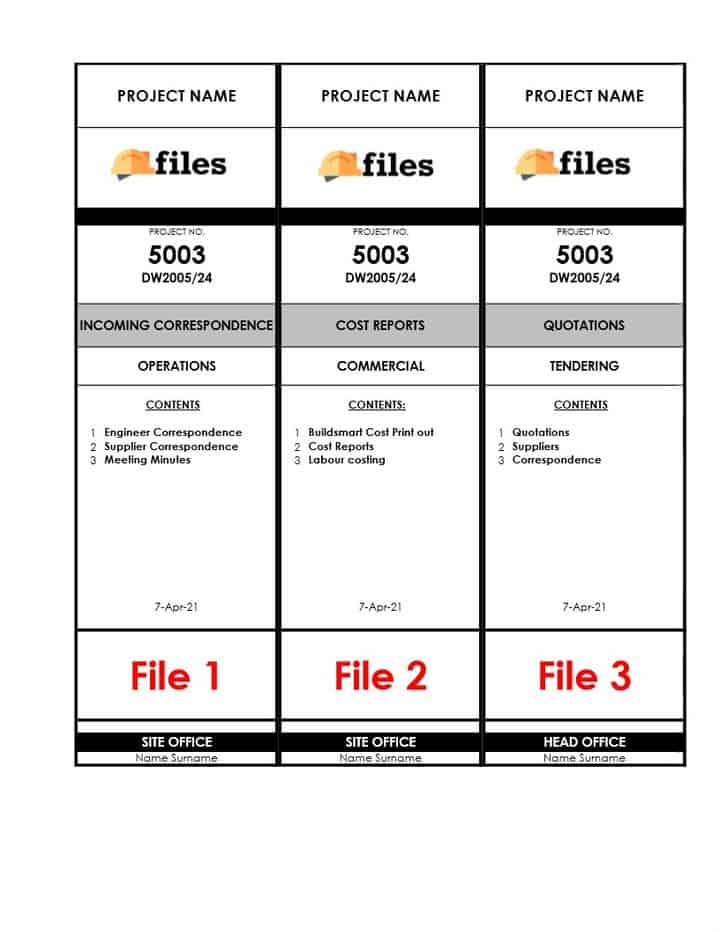
This file label template gives you printable filing labels for project binders and files. Even with digital records, physical copies of key documents are still needed on most projects, and clear labels make it easy to see what is in each binder.
What is a file label?
A file label is a printed tag fixed to the spine or front of a binder, folder or box file that shows what is inside. On a construction project it might show the project name and number, the document type, such as contracts, RFIs, submittals or safety records, and the date range covered. Consistent file labels make a site office or project archive easier to search, help new team members find documents quickly and support an orderly handover at closeout.
When to use it
- Setting up binders at project startup
- Organizing hard copies of contracts, drawings, permits and safety records
- Preparing closeout and handover binders for the client
- Archiving completed projects so files can be found years later
- Tidying the site office so the latest documents are easy to find
What’s included
This product is a set of filing labels supplied as a spreadsheet file (.xlsx). Type your file names into the template, print the labels and apply them to your binders so you can easily identify what each file contains.
How to fill it out
- Decide on a filing structure for the project, such as by document type or discipline.
- List the files you need and give each a clear, consistent name.
- Enter the project name or number and the file title for each label.
- Print a test page on plain paper and check it lines up with your binders.
- Print the labels and fix them to the binder spines or covers.
- Update or replace labels when the contents of a file change.
Tips
- Match your label names to your project filing register so paper and digital files use the same titles.
- Use the same font size and layout on every label so binders line up neatly on the shelf.
- Add a date range or volume number when one subject runs across several binders.
- Keep a spare blank copy of the template in your project startup folder.
Related templates and guides
- Filing Register
- Example Project Filing Procedures
- Submittal Cover Sheet
- Construction Project Closeout
- Administration templates
Frequently asked questions
What should be on a file label?
At minimum, the project name or number and a clear title for the contents. Many teams also add the document type, discipline, date range and a volume number when one subject fills several binders. Keep the format the same on every label.
How do you organize construction project files?
Pick a structure and stick to it. Common options are by document type, such as contracts, RFIs, submittals, change orders and safety, or by discipline or trade. Record the structure in a filing register so paper and digital files follow the same system.
Can I edit this file label template?
Yes. The labels are supplied as a spreadsheet, so you can type your own file names, project details and dates into the template before printing, and save a copy to reuse on your next project.
Why do construction projects still need physical files?
Many sites keep printed copies of key documents for quick reference in the field, for inspectors and for clients who require hard-copy handover binders. Some permits, signed forms and records may also need to be kept on site in paper form.
What is the best way to label binder spines?
Keep spine labels short and readable from a distance. Put the most important information, usually the file title and project number, in the largest text, and use the same position and layout on every binder.





Reviews
There are no reviews yet