
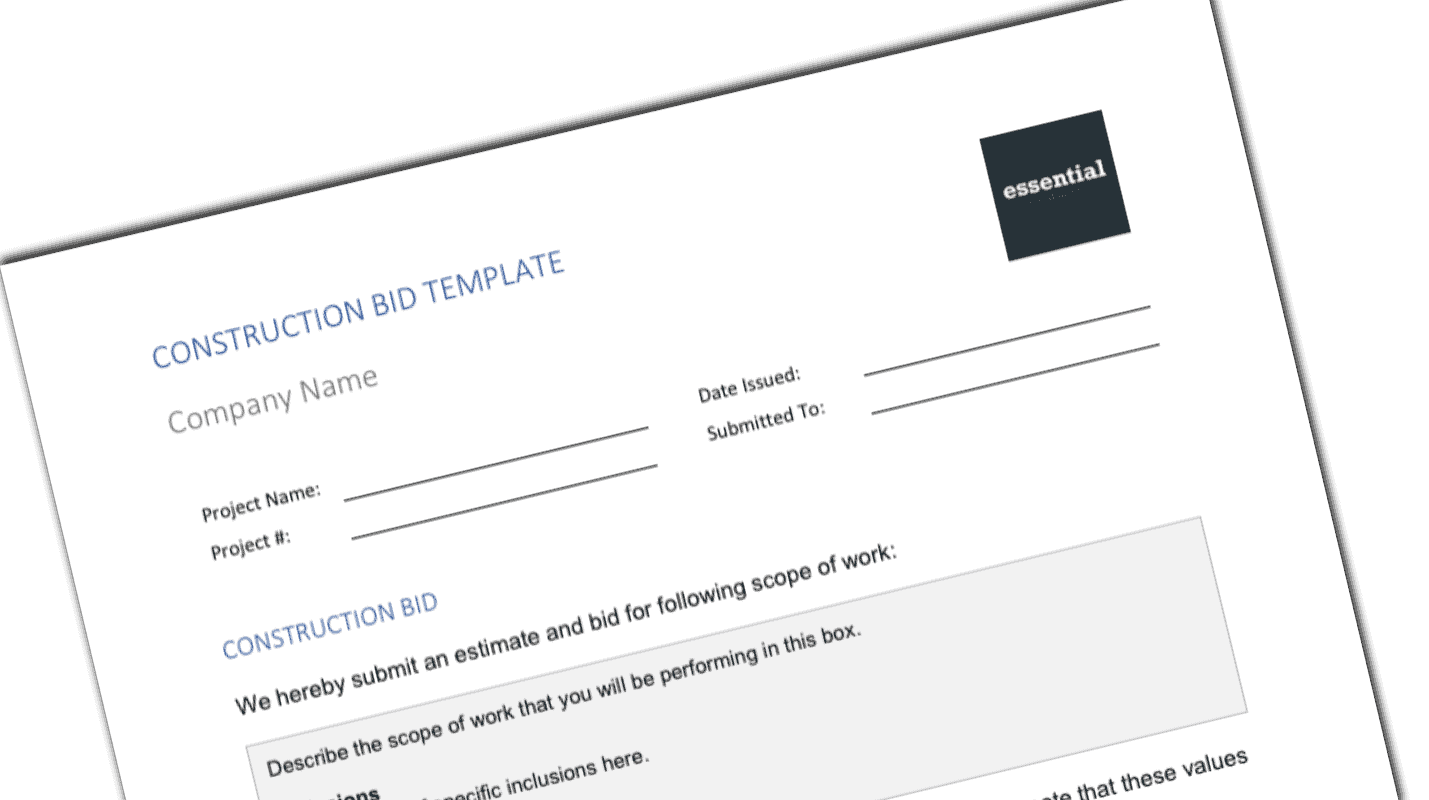
Construction Bid Template
$4.99
- Standardize bid submissions
- Avoid confusion on estimates and hand written notes
- Protect yourself with exclusions and notes
Templates are starting points. Adapt them to your contract and to the laws and safety rules where you work. They are not legal advice.
Product FAQ
You will receive your documents and files immediately after you complete the checkout process. You will receive a link on the checkout page as well as via email.
As long as the document remains on Essential Construction you will be able to download it once purchased.
Yes, in most cases (with the exception of stock photography and ebooks) the files you will receive are editable.
We accept debit, all credit cards (Visa, Amex Mastercard etc) as well as payments via Apple Pay, Google Pay and Paypal.
Our return policy varies based on the product, for more information you can find our detailed return policy here.
Our documents are for use on your projects. You may not resell these documents on other marketplaces.
Full Description
This construction bid template gives contractors and subcontractors a clean, standard way to submit a price for a job. It puts the project details, bid price and clarifications on one page, so the owner or general contractor knows exactly what you are offering and what you are not.
What is a construction bid?
A construction bid is a document a contractor or subcontractor submits to win work. It describes the scope of work being offered, states the price, and lists any inclusions, exclusions and conditions tied to that price. The owner or general contractor uses bids to compare contractors on the same scope. A clear bid reduces scope gaps, protects you from arguments later, and makes your company look organized.
When to use it
- Pricing a job for an owner, developer or homeowner
- Submitting a subcontract price to a general contractor at tender
- Re-pricing after an addendum or scope change
- Confirming a verbal or emailed quote in writing
- Replacing handwritten estimates and notes with a consistent company format
What’s included
- Editable bid document for Microsoft Word, Google Docs or Open Office (.docx file)
- Project name and project number
- Date submitted
- Owner name
- Bid clarifications: inclusions and exclusions
- Bid price
- Space for the owner or contractor to sign in acknowledgement
- Placeholder logo you can remove and replace with your own
How to fill it out
- Read the drawings, specifications and any addenda, and note the bid due date.
- Fill in the project name, number, owner and the date you are submitting.
- Write a short scope summary that names the drawings, spec sections and addenda your price is based on.
- List inclusions so the reader knows what is covered, then list exclusions and assumptions in plain language.
- Enter the bid price and note whether taxes, permits and bonds are included.
- Replace the logo, check every editable field, save as PDF and send it before the deadline.
- Ask the owner or contractor to sign the acknowledgement once the bid is accepted.
Common mistakes to avoid
- Leaving exclusions vague, such as “by others” with no detail.
- Not listing the addenda you priced, which opens the door to scope disputes.
- Missing the bid due time or the delivery method the owner asked for.
- Sending your own form when the owner requires their bid form; attach yours as a clarification instead.
Related templates and guides
- Estimating templates
- Construction quotation template – for smaller quotes
- Estimate assumptions, inclusions and exclusions – build your clarifications list
- Bid bond template
- Construction tendering: everything you need to know
Frequently asked questions
What should a construction bid include?
At minimum: the project name and number, the date, who the bid is for, a scope summary, the price, and clear inclusions and exclusions. Add the drawings, specs and addenda you priced, how long the price is valid, and a signature line so acceptance is documented.
What is the difference between a bid, an estimate and a proposal?
An estimate is your internal calculation of what the work will cost. A bid is the formal price you submit against a defined scope, often in a competitive tender. A proposal is usually broader and can include approach, schedule, team and qualifications alongside the price.
Can subcontractors use this bid template?
Yes. The template works for subcontractors pricing to a general contractor as well as contractors pricing to an owner. Change the addressee and the scope summary to match the trade package you are bidding.
Is this bid template in Word or Excel?
It is a document file for Microsoft Word, and it also opens in Google Docs or Open Office. Pay attention to the fields marked for editing, and replace the sample logo with your own company logo.
Why are exclusions important in a bid?
Exclusions tell the reader what your price does not cover, such as permits, testing, or work by other trades. Clear exclusions prevent scope gaps when bids are compared and give you a written record if there is a disagreement about scope after award.







Reviews
There are no reviews yet