
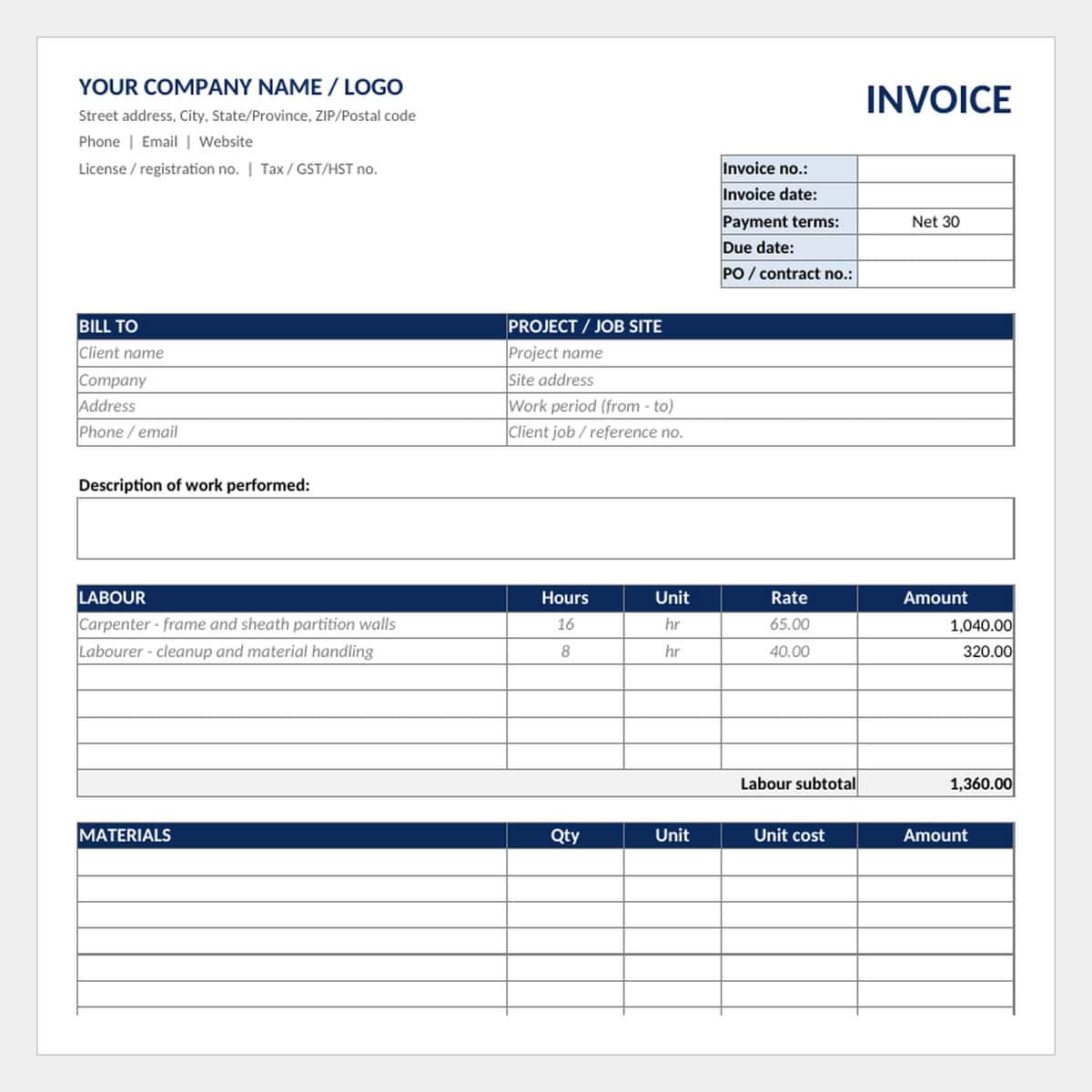
Contractor Invoice Template
$4.99
- One-page construction invoice: labour, materials, equipment and subs
- Markup, tax, retainage and deposits calculated for you
- Built-in invoice log tracks paid, open and overdue invoices
Templates are starting points. Adapt them to your contract and to the laws and safety rules where you work. They are not legal advice.
Product FAQ
You will receive your documents and files immediately after you complete the checkout process. You will receive a link on the checkout page as well as via email.
As long as the document remains on Essential Construction you will be able to download it once purchased.
Yes, in most cases (with the exception of stock photography and ebooks) the files you will receive are editable.
We accept debit, all credit cards (Visa, Amex Mastercard etc) as well as payments via Apple Pay, Google Pay and Paypal.
Our return policy varies based on the product, for more information you can find our detailed return policy here.
Our documents are for use on your projects. You may not resell these documents on other marketplaces.
Full Description
This contractor invoice template is a one-page Excel invoice for construction work. Enter labour, materials, equipment and subcontractor costs and it calculates subtotals, markup, sales tax, retainage and the amount due. A built-in invoice log tracks what each client has paid, what is still open and which invoices are overdue.
What is a contractor invoice?
A contractor invoice is the bill a contractor or trade sends a client for work completed. It shows who did the work, where and when, what was supplied, how the price was built up and how much is due by what date. A clear invoice with backup gets approved faster and leaves fewer questions about what was charged.
When to use it
- Small jobs, service calls and repairs billed once the work is done
- Time-and-material work, using your T&M tickets as backup
- Extra work or approved change orders billed separately from the main contract
- Residential renovation work billed by stage or on completion
For contract work billed monthly against a schedule of values, use the Construction Progress Billing Template instead.
What’s included
The download is an Excel workbook (.xlsx) with three sheets:
| Sheet | What it does |
|---|---|
| Invoice | Company block, invoice number, date, terms, due date and PO or contract number; Bill To and project or job site; description of work; labour (hours x rate), materials (quantity x unit cost), equipment and subcontractor or other cost sections with subtotals; markup %, tax rate, retainage or holdback %, deposits received and amount due; payment instructions, notes and signature |
| Invoice Log | 100-row tracker of invoice number, client, project, dates, total, amount paid, balance, days overdue and status (Open, Part paid, Overdue, Paid), with totals |
| Instructions | Step-by-step guide to completing and sending the invoice |
All amounts calculate automatically, and the invoice prints on one letter-size page so you can save it as a PDF and email it.
How to fill out a contractor invoice
- Add your company name, logo, address, licence or registration number and tax number.
- Enter a unique invoice number, the invoice date, payment terms and the client’s PO or contract number. The due date fills in as 30 days after the invoice date; change it if your terms differ.
- Fill in the client’s details and the project name, site address and dates the work was done.
- Describe the work in plain language.
- Enter labour hours and rates, materials, equipment and any subcontractor, permit, disposal or delivery costs.
- Enter your markup % if you mark up materials, equipment and subs, and the sales tax, GST or HST rate that applies to your work.
- Enter a retainage or holdback % only if your contract calls for it, and any deposit already received.
- Add payment instructions, sign, save as PDF, send with your backup and record the invoice on the Invoice Log.
Tips for getting paid faster
- Match the client’s PO or contract number and the names they use for the job.
- Attach backup for anything the client hasn’t seen: timesheets, supplier receipts, signed T&M tickets or change orders.
- Invoice as soon as the work is done and follow up on the due date. The Invoice Log flags overdue invoices in red.
- Tax rules vary by state, province and type of work. Confirm what is taxable with your accountant.
Related templates and guides
- Construction Time and Material Template for T&M backup
- Time And Material Tracking Sheet
- Change Order Log to track extras before you bill them
- What is retainage?
Frequently asked questions
What should a contractor invoice include?
Your business name and contact details, the client’s details, a unique invoice number, invoice and due dates, the project and site address, a description of the work, itemized labour, materials and other costs, any markup and tax, deposits or retainage, the amount due and how to pay.
What is the difference between an invoice and a progress billing?
An invoice bills a defined piece of work, usually once it is done. A progress billing bills a share of a larger contract each period, based on percent complete against a schedule of values, and usually carries retainage and previous billings forward.
What does “Net 30” mean on an invoice?
It means the full amount is due 30 days after the invoice date. You can change the terms and the due date formula to match your contract, for example Net 15 or due on receipt.
Should I add retainage to a small invoice?
Only if your contract or subcontract requires it. Retainage (holdback in Canada) is a portion of each payment the client keeps until the work is complete. Leave the retainage % at 0 if it doesn’t apply.
Is this template free?
It is a paid template at the price shown on this page, or you can download it free with a 14-day membership trial.


Reviews
There are no reviews yet