
Construction Punch List Template
$4.99
- Track every punch item by area, trade and responsible subcontractor
- Status, due dates and overdue items update automatically
- Summary by trade and a completion sign-off sheet
Templates are starting points. Adapt them to your contract and to the laws and safety rules where you work. They are not legal advice.
Product FAQ
You will receive your documents and files immediately after you complete the checkout process. You will receive a link on the checkout page as well as via email.
As long as the document remains on Essential Construction you will be able to download it once purchased.
Yes, in most cases (with the exception of stock photography and ebooks) the files you will receive are editable.
We accept debit, all credit cards (Visa, Amex Mastercard etc) as well as payments via Apple Pay, Google Pay and Paypal.
Our return policy varies based on the product, for more information you can find our detailed return policy here.
Our documents are for use on your projects. You may not resell these documents on other marketplaces.
Full Description
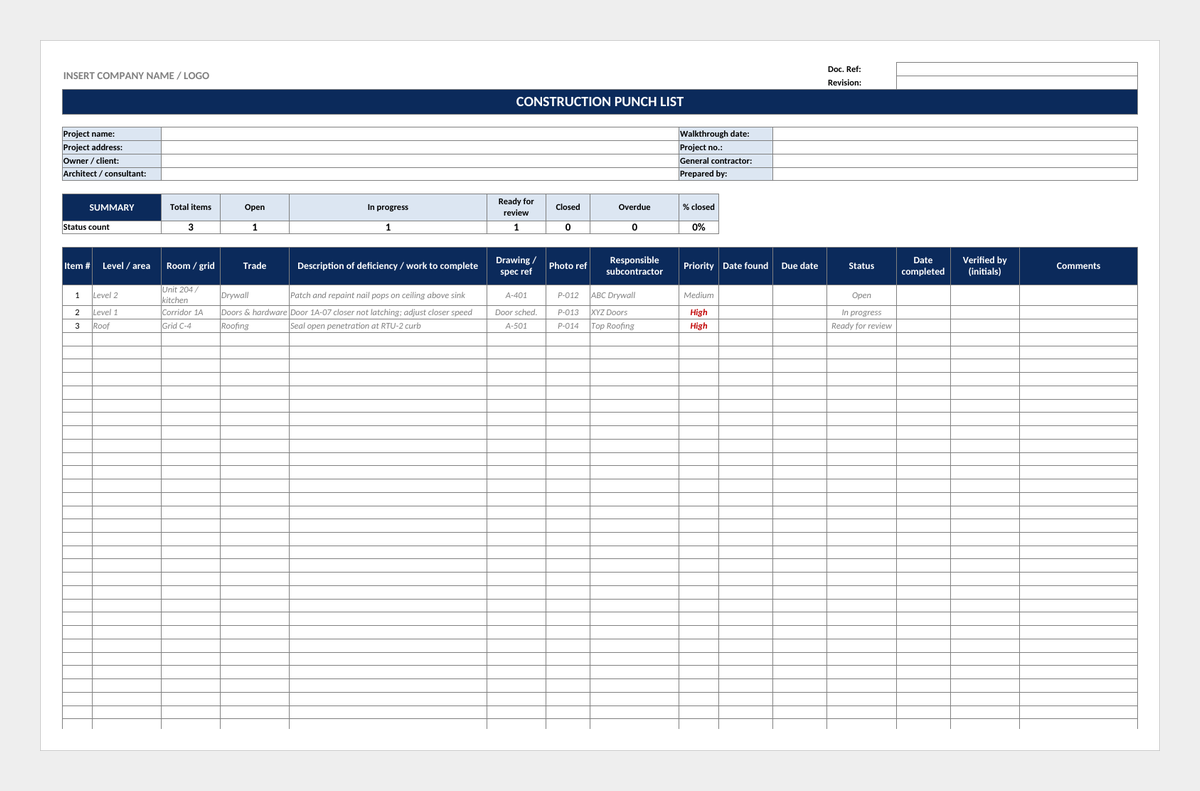
This construction punch list template is an Excel tracker for the items that still need to be finished, fixed or replaced before a project is handed over. Record each item by area and trade, assign it to the responsible subcontractor, set a due date, track its status until it is verified closed, then get the list signed off.
What is a punch list in construction?
A punch list is a written list of work that does not yet meet the contract documents near the end of a job: damaged finishes, missing trim, doors that don’t latch, fixtures not working, paint touch-ups. The owner, architect or consultant and the contractor usually build it during a walkthrough, and each item is fixed and checked off before closeout. See the punch list glossary entry for more background.
When to use it
- During pre-handover walkthroughs, area by area, as finishes are completed
- At the substantial completion walkthrough with the owner and design team
- On tenant fit-outs, renovations and unit turnovers where many small items have to be closed fast
- When you need to show the owner exactly what is open, who owns it and when it will be done
What’s included
The download is one Excel workbook (.xlsx) with five sheets:
| Sheet | What it does |
|---|---|
| Punch List | 150 numbered item rows with level/area, room or grid, trade, description, drawing or spec reference, photo reference, responsible subcontractor, priority, date found, due date, status, date completed, verified-by initials and comments |
| Summary block | Live counts of total, open, in progress, ready for review, closed and overdue items, plus % closed |
| By Trade | Open, in progress, ready for review and closed counts for every trade, so you know which subs to chase |
| Sign-Off | Completion sign-off for the general contractor, owner, architect or consultant and subcontractors, with space to list excluded items |
| Lists and Instructions | An editable trade list behind the drop-downs and step-by-step instructions |
Drop-down lists for trade, priority and status keep entries consistent. Closed rows turn green and overdue rows turn red automatically. The sheet prints landscape on letter paper with the header row repeated on every page.
How to fill out a punch list
- Fill in the project header: project name, address, owner, general contractor, architect or consultant and the walkthrough date.
- Walk the building in a fixed order (level, unit, room or grid line) so nothing is skipped.
- Write one item per row. Say what is wrong and what finished looks like, for example “touch up paint on east wall around outlet” rather than “paint”.
- Add a drawing or spec reference and a photo number where it helps the sub find the item.
- Choose the trade, name the responsible subcontractor, set a priority and a realistic due date.
- Filter by trade or subcontractor and send each sub their items.
- When a sub reports an item done, set it to “Ready for review”. Only the person who checks the work marks it “Closed” and adds initials and the date.
- When every item is closed, or the remaining items are listed as excluded, print the Sign-Off sheet and collect signatures.
Tips for a shorter punch list
- Run your own quality walk before the owner’s walkthrough. Items you find first are cheaper and faster to close.
- Protect finished work. A lot of punch work is damage caused by the next trade through the area.
- Keep one master list per project. Several versions in different inboxes is how items get missed.
- Re-check an area before closing items in it, and don’t sign off on work you didn’t see.
Related templates and guides
- Deficiency Log Template, the Canadian-style deficiency list for the same job
- Construction Project Quality Checklist (250+ items) for your own quality walk before the punch walkthrough
- Simple Certificate of Completion Template for handover
- Certificate of Final Acceptance once the punch list is closed
Frequently asked questions
Who creates the punch list?
Usually the general contractor and the owner’s representative (often the architect or consultant) walk the project together and agree on the list. Many contractors also keep their own internal punch list earlier in the job so they arrive at the formal walkthrough with fewer items.
When is a punch list done?
It is normally prepared near the end of the job, around substantial completion, when the work is complete enough to be used but small items remain. On larger projects, punch lists are often done floor by floor or area by area as finishes are completed.
What is the difference between a punch list and a deficiency list?
They are the same idea. “Punch list” is the common term in the US, while “deficiency list” or “deficiency log” is widely used in Canada. Both record incomplete or defective work, who is responsible and when it was fixed and accepted.
What should each punch list item include?
At minimum: a clear location, a description of what needs to be done, the responsible trade or subcontractor, a due date and a status. A photo or drawing reference and the initials of the person who verified the fix make the list much easier to close out.
Is this template free?
It is a paid template at the price shown on this page, or you can download it free with a 14-day membership trial.


Reviews
There are no reviews yet