
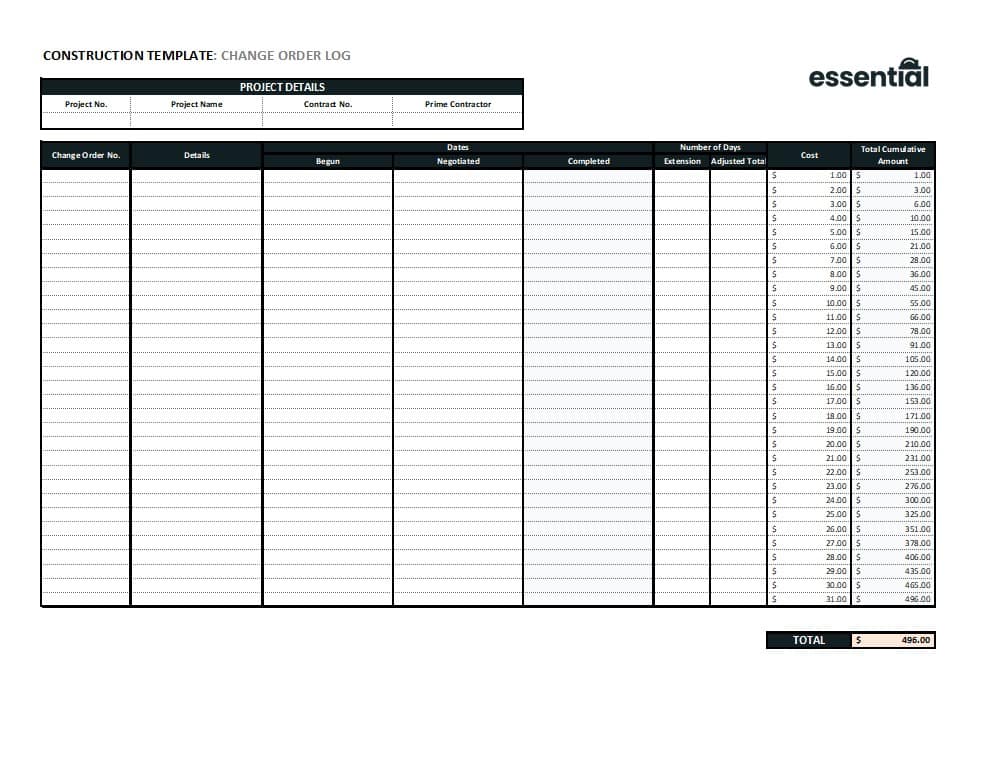
Project Change Order Log
$4.99
Log all of your changes and keep track of them.
Templates are starting points. Adapt them to your contract and to the laws and safety rules where you work. They are not legal advice.
Product FAQ
You will receive your documents and files immediately after you complete the checkout process. You will receive a link on the checkout page as well as via email.
As long as the document remains on Essential Construction you will be able to download it once purchased.
Yes, in most cases (with the exception of stock photography and ebooks) the files you will receive are editable.
We accept debit, all credit cards (Visa, Amex Mastercard etc) as well as payments via Apple Pay, Google Pay and Paypal.
Our return policy varies based on the product, for more information you can find our detailed return policy here.
Our documents are for use on your projects. You may not resell these documents on other marketplaces.
Full Description
This change order log is a construction spreadsheet for tracking every change on your project in one place. It records each change with its number, name, time delay and cost impact, and totals the cost impact to the project so you always know where the budget stands.
What is a change order log?
A change order log is a running register of all changes to a construction contract. Each row is one change, with a reference number, a short description, its status, the cost impact and any time impact. The log gives the project manager, owner and accounting team a single view of approved and pending changes, so the revised contract value and completion date can be checked at any time. A log of pending requests is often called a change order request (COR) log.
When to use it
- Tracking change order requests from subcontractors before they are approved
- Recording owner-approved change orders against the contract value
- Preparing monthly cost reports and forecasts
- Reviewing time extensions and their effect on the schedule
- Closing out the project and agreeing the final contract sum
What’s included
The log is an Excel spreadsheet (.xlsx) with columns to track:
- Change number
- Change name
- Time delay
- Cost impact
- Total cost impact to the project
How to fill it out
- Give every change a unique number as soon as it is raised, even if it may be rejected later.
- Enter a short, clear change name that anyone on the team will recognize.
- Record the time delay in days, or enter zero if the change has no schedule impact.
- Enter the cost impact, using a negative value for credits.
- Check that the total cost impact updates and matches your cost report.
- Update the log at every change meeting and keep a copy with the monthly report.
Common mistakes to avoid
- Leaving out rejected or withdrawn changes. Keep them in the log so the numbering has no gaps.
- Mixing pending and approved costs without marking which is which.
- Starting work before the change is approved in writing.
- Recording time delays without the supporting schedule analysis.
Related templates and guides
- Change Order Template
- Change Proposal Template
- Variation Order (VAO) Register
- Change Order [CO]
- Your Guide to Submitting a Construction Change Request
Frequently asked questions
What is a COR log in construction?
A COR log is a change order request log. It tracks requests for changes that have been submitted but not yet approved, with their value and status. Once a request is approved, it becomes a change order and moves to the approved change order log.
What should a change order log include?
At minimum, a change number, a description, the cost impact, the time impact and the running total. Many teams also add the date raised, who raised it, the status and the date approved.
What is the difference between an RFI and a change order?
An RFI is a question asking the design team to clarify the contract documents. It does not change the contract. A change order is a signed agreement that changes the scope, price or time. An RFI answer can lead to a change order if it adds work.
What is the difference between a change order and an addendum?
An addendum changes the bid documents before the contract is signed, so every bidder prices the same scope. A change order changes the signed contract after award, usually while work is underway, and adjusts the price, the time or both.
Who maintains the change order log?
Usually the contractor’s project manager or project coordinator keeps the log, and the owner’s representative reviews it. It should be updated whenever a change is raised, priced, approved or rejected.






Reviews
There are no reviews yet