
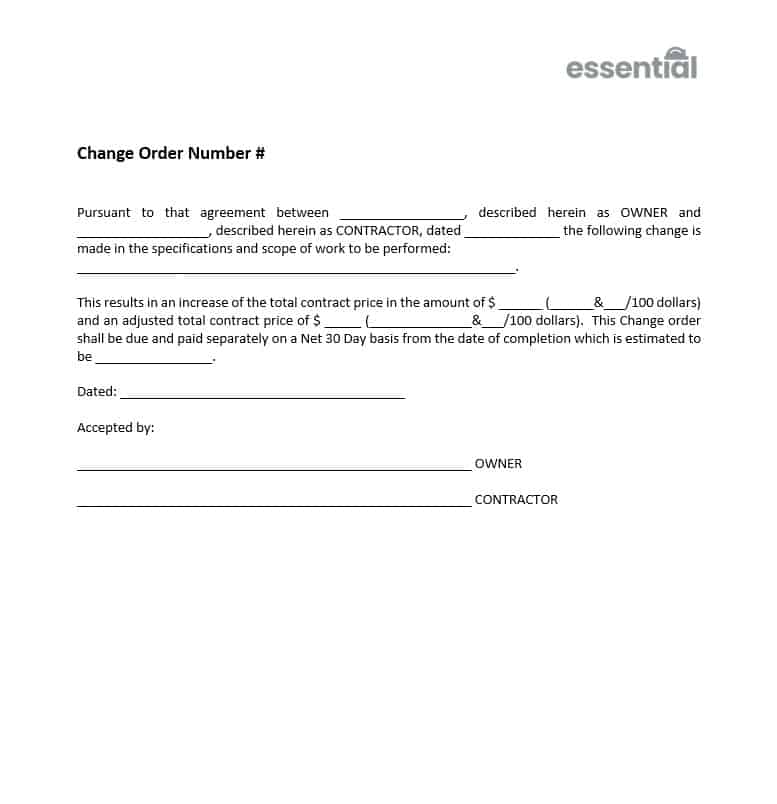
Change Order Template
$2.99
This change order template will provide you with a fast, easy way to modify a contract to include new or modified scope.
Templates are starting points. Adapt them to your contract and to the laws and safety rules where you work. They are not legal advice.
Product FAQ
You will receive your documents and files immediately after you complete the checkout process. You will receive a link on the checkout page as well as via email.
As long as the document remains on Essential Construction you will be able to download it once purchased.
Yes, in most cases (with the exception of stock photography and ebooks) the files you will receive are editable.
We accept debit, all credit cards (Visa, Amex Mastercard etc) as well as payments via Apple Pay, Google Pay and Paypal.
Our return policy varies based on the product, for more information you can find our detailed return policy here.
Our documents are for use on your projects. You may not resell these documents on other marketplaces.
Full Description
This change order template gives you a fast, easy way to modify a construction contract to include new or modified scope. Change orders are the contract mechanism that lets an owner or architect adjust the value or duration of a contractor’s work, and a clear form keeps every change documented and signed.
What is a change order?
A change order is a written amendment to a construction contract, signed by the owner and contractor (and often the architect), that changes the scope of work, the contract price, the contract time, or a combination of these. Change orders are used when the design changes, the owner adds or removes work, unforeseen site conditions are found, or errors and omissions need to be fixed. Once signed, the change order becomes part of the contract.
When to use it
- The owner requests extra work or deletes part of the scope
- A design revision, RFI response or site instruction changes the work
- Unforeseen conditions, such as hidden structure or poor soil, require additional work
- Material substitutions or alternates are accepted after award
- The contract time needs to be extended because of approved changes
What’s included
The download is an editable Word document (.docx). It is a change order form that gives you a fast, simple way to modify a contract to include new or modified scope. Add your company details and adjust the wording to match your contract.
How to fill it out
- Enter the project name, contract reference, change order number and date.
- Name the owner, contractor and architect or consultant.
- Describe the change clearly: what is added, deleted or modified, with references to drawings, RFIs or site instructions.
- Show the cost of the change and attach the breakdown of labor, materials, equipment, subcontractor costs and markup.
- State the change to contract time, even if it is zero days.
- Show the original contract sum, previous approved changes, this change and the revised contract sum.
- Have each party sign and date the change order, then record it in your change order log.
Common mistakes to avoid
- Starting extra work on a verbal instruction with nothing in writing
- Vague descriptions such as “additional work as discussed”
- Leaving out the time impact, then claiming delay later
- Not tracking pending changes, so cost overruns surprise the owner
Related templates and guides
- Change Order Log Template
- Variation Order Template
- Your Guide to Submitting a Construction Change Request
- Glossary: Change Order
- Glossary: Change Directive
Frequently asked questions
How do you write a change order?
Identify the contract and number the change. Describe exactly what work is added, deleted or modified and why, with references to drawings or instructions. State the cost with a breakdown, the time impact and the revised contract sum. Then have the owner, contractor and architect sign.
Who signs a change order?
Usually the owner and the contractor, and often the architect or contract administrator, depending on the contract. On subcontracts, the general contractor and subcontractor sign. Check your contract for who has authority to approve changes and any value limits.
What is the difference between a change order and a change directive?
A change order is agreed and signed by both parties, including price and time. A change directive is an instruction from the owner or architect to proceed with a change before price or time is agreed, so the work is not held up. The cost is settled later.
Can work start before a change order is signed?
It is risky. Without a signed change order or written directive, you may struggle to get paid for the work. If the owner needs the work to proceed urgently, get a written instruction or change directive first and price the change as soon as possible.
What is the difference between a change order and a variation order?
They serve the same purpose. “Change order” is the common term in the US and Canada. “Variation” or “variation order” is used in the UK, Australia and many other countries, depending on the form of contract.






Reviews
There are no reviews yet