
Project RFI Log Template
$4.99
Use this log to master the RFI process on your project.
Templates are starting points. Adapt them to your contract and to the laws and safety rules where you work. They are not legal advice.
Product FAQ
You will receive your documents and files immediately after you complete the checkout process. You will receive a link on the checkout page as well as via email.
As long as the document remains on Essential Construction you will be able to download it once purchased.
Yes, in most cases (with the exception of stock photography and ebooks) the files you will receive are editable.
We accept debit, all credit cards (Visa, Amex Mastercard etc) as well as payments via Apple Pay, Google Pay and Paypal.
Our return policy varies based on the product, for more information you can find our detailed return policy here.
Our documents are for use on your projects. You may not resell these documents on other marketplaces.
Full Description
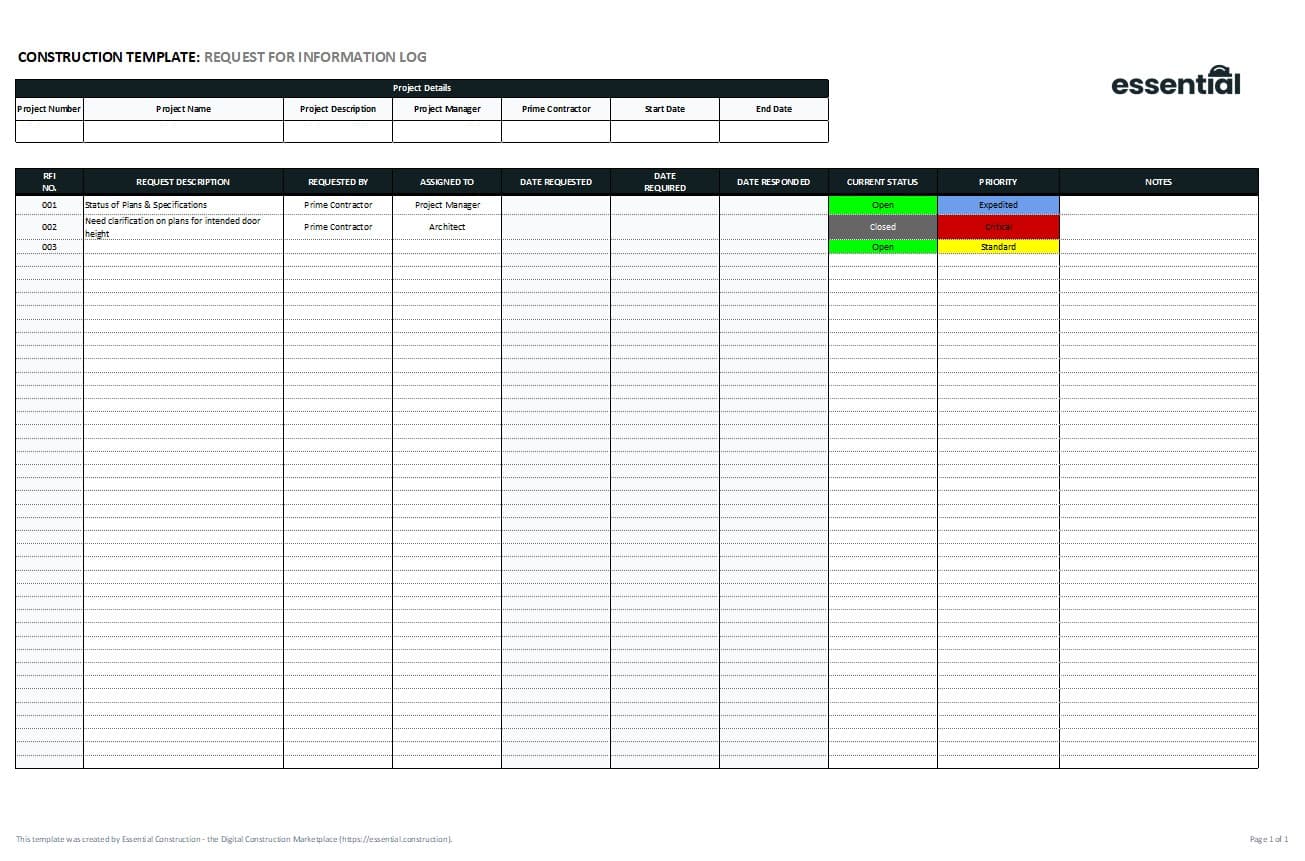
This RFI log template is a spreadsheet for tracking every request for information on your construction project, from the day it is issued to the day it is answered. Use it to see at a glance which RFIs are outstanding and how long the design team takes to return them.
What is an RFI log?
An RFI log, also called an RFI tracker or RFI register, is a single list of all the requests for information issued on a project. Each RFI gets a line showing its number, what it is about, when it was sent, when an answer is due, when it came back and its current status. RFIs are the formal way to ask a question on a jobsite and a critical part of project administration, so tracking them matters as much as writing them.
When to use it
- On any project where RFIs are sent to the architect, engineer or owner.
- To prepare the RFI section of your weekly site or coordination meeting.
- To follow up on late responses before they hold up work.
- To show how long answers took if a delay or claim is discussed later.
- To hand over a clean record of questions and answers at project closeout.
What’s included
The log is an editable spreadsheet you can use on any project. It tracks:
- RFI number
- RFI description
- Date issued
- Expected date of return
- Date returned
- Status
- Comments
How to fill it out
- Set up the log at the start of the project with the project name and number.
- Add a new line as soon as each RFI is issued, using the next number in sequence.
- Write a short description that makes the RFI easy to find later, including the area or drawing it relates to.
- Enter the date issued and the date you need a response.
- When the answer comes back, enter the date returned and update the status.
- Use the comments column for follow-ups, related change orders or notes on impact.
- Review open items every week and chase anything past its expected return date.
Tips
- Never reuse or skip RFI numbers. A clean sequence makes the log easy to audit.
- Sort or filter by status before meetings so open RFIs are at the top.
- Note when an answer leads to a change in cost or time, so it is followed up through your change process.
Related templates and guides
- RFI (Request For Information) Template to write the RFIs you track here.
- Construction RFI Workflow Template to set who reviews and answers RFIs.
- Correspondence Tracker Template for letters and other project correspondence.
- RFI in Construction: What It Is, How to Write One (+ Examples)
Frequently asked questions
What is the purpose of an RFI log?
An RFI log gives the project team one place to see every question asked, who it went to, when it is due and whether it has been answered. It helps you chase late responses, plan work around open questions and keep a clear record of decisions for the rest of the project.
What is the difference between an RFI log and an RFI form?
An RFI form is the document used to ask one question, with the details, references and response. An RFI log is the list that tracks all of those forms on the project. Most teams use both: a form for each RFI and a log to manage them together.
Who maintains the RFI log?
The general contractor’s project manager, project coordinator or site engineer usually maintains the log, since they issue most RFIs. On some projects the architect or construction manager keeps a master log. Agree at the start who owns it so there is one up-to-date version.
What does RFI status mean in a log?
Status shows where each RFI stands, such as open, answered or closed. Some teams also use statuses like overdue or needs more information. Keep the list of statuses short and use the same terms on every project so the log is easy to read.






Reviews
There are no reviews yet