
Drawing Register – Template
$6.99
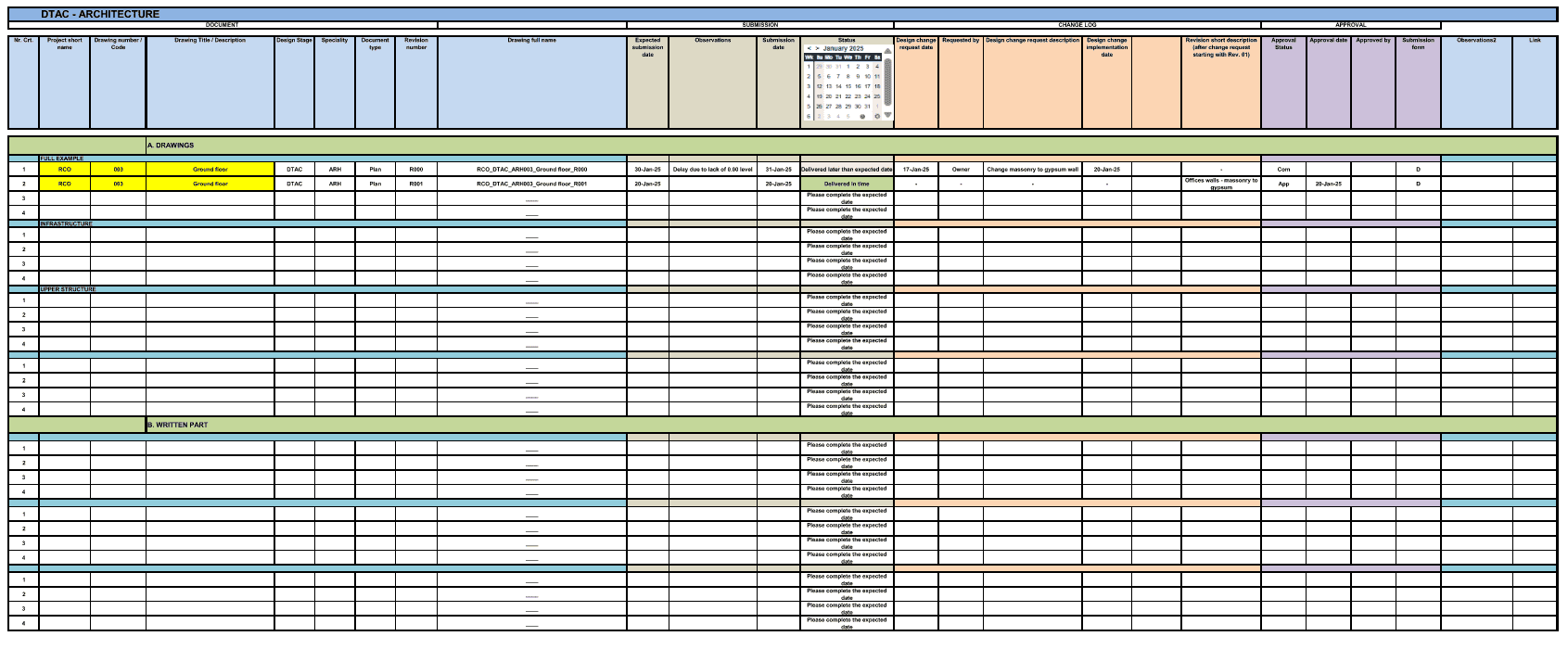
Use this drawing register to effectively track the various drawing submissions on your project, their status and review comments.
Templates are starting points. Adapt them to your contract and to the laws and safety rules where you work. They are not legal advice.
Product FAQ
You will receive your documents and files immediately after you complete the checkout process. You will receive a link on the checkout page as well as via email.
As long as the document remains on Essential Construction you will be able to download it once purchased.
Yes, in most cases (with the exception of stock photography and ebooks) the files you will receive are editable.
We accept debit, all credit cards (Visa, Amex Mastercard etc) as well as payments via Apple Pay, Google Pay and Paypal.
Our return policy varies based on the product, for more information you can find our detailed return policy here.
Our documents are for use on your projects. You may not resell these documents on other marketplaces.
Full Description
This drawing register template gives your project one place to log every drawing issued during design and construction. Use it to track drawing submissions, their current revision, review comments and approval status, so everyone builds from the right sheet.
What is a drawing register?
A drawing register is a list of every drawing on a project with its number, title, revision and issue details. It shows which version is current, when it was issued, who it went to and whether it has been reviewed or approved. On construction projects the register is the reference the design team, contractor and trades check before they build, order or fabricate anything. It is also a key record for change management, disputes and project closeout.
When to use it
- At design kickoff, to set up drawing numbers and titles for each discipline
- Each time a drawing is issued or revised, for tender, for construction or as a sketch
- When drawings come back from review with comments or an approval status
- Before a trade starts work, to confirm they hold the latest revision
- At handover, to check the as-built set against the final register
What’s included
The drawing register is a spreadsheet (.xlsx) that tracks:
- Date of issue
- Drawing number
- Drawing title
- Document type
- Drawing comments
- Design changes
- Review and approval status
How to fill it out
- Agree a numbering system with the design team before the first issue.
- Enter each drawing with its number, title and document type.
- Record the issue date every time a drawing or revision goes out.
- Log design changes and review comments against the drawing they apply to.
- Update the review and approval status as soon as a response comes back.
- Share the updated register with each drawing issue so the team can check what is current.
Common mistakes to avoid
- Letting more than one person keep their own version of the register. Keep one master copy.
- Recording a new revision without noting what changed.
- Leaving superseded drawings in circulation on site. Mark them clearly and remove them.
- Waiting until month end to update the log. Update it with every issue.
Related templates and guides
- Drawing Issue Register
- Construction Transmittal Template
- Construction Submittal Schedule Template
- Construction Submittals: Types, Process, Log and Examples
- Design templates
Frequently asked questions
What is a drawing register in construction?
It is the master list of all project drawings with their numbers, titles, revisions, issue dates and status. The contractor, design team and trades use it to confirm which drawing is current before they build, price or fabricate, and it forms part of the project record at closeout.
What should a drawing register include?
At a minimum it should include the drawing number, title, document type, current revision, date of issue, comments and review or approval status. Many teams also note who each issue went to and a short description of the change.
What is the difference between a drawing register and a transmittal?
A transmittal is a cover document that records one issue of drawings or documents to a recipient. The drawing register is the running log of every drawing and its full history. Each transmittal should be reflected in the register.
Who maintains the drawing register?
It is usually maintained by the design team’s document controller or the contractor’s project coordinator or engineer. What matters most is that one person owns it and updates it every time drawings are issued or returned.
How often should the drawing register be updated?
Update it every time a drawing is issued, revised, reviewed or approved. A register that falls behind quickly loses value because nobody can trust it to show the current revision.





Reviews
There are no reviews yet